architecture
the yf kernel, embedded skills, beads, and upstream tracking
yoshiko-flow is two things that fit together: a family of portable, cross-harness agent
skills, and a single compiled CLI — yf — that installs, upgrades, verifies, and
preflights those skills and the toolchain they depend on. The product is yoshiko-flow; the
binary you install and run is yf.
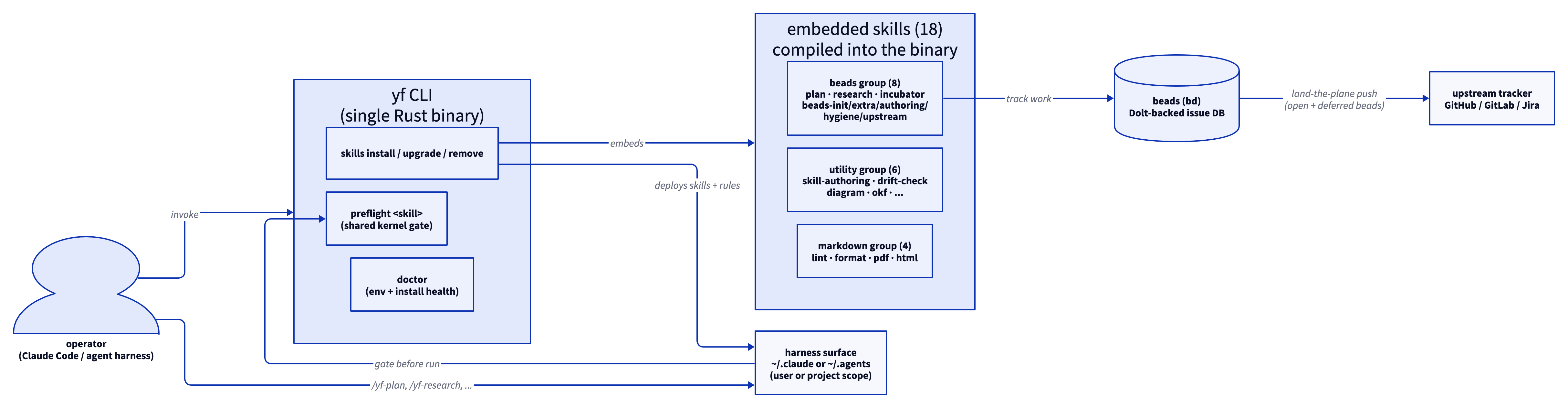
The yf kernel
yf is one self-contained Rust binary — no runtime, no dependencies of its own. It is the
installer / verifier / preflight kernel. It does not run skills, track issues, or render
markdown — those are the skills themselves. Its jobs:
yf skills— the lifecycle:install,upgrade,remove,status. Deploys skills into a scope (userorproject) and a harness surface (claudeoragents).yf preflight <skill>— the shared readiness gate every beads-backed skill runs through, rather than each skill reimplementing it. Returns a single authoritativestatus.yf doctor— checks the environment (bd,uv,git) and every installed skill's integrity marker and companion rule.
Embedded skills
The entire skill tree is embedded in the yf binary at build time, so installing skills
needs no network access and no repo clone — the skills you get always match the binary you
already have. yf ships 18 skills. Grouped by what they do:
- workflows (3) — the end-to-end, beads-tracked skills you invoke to get work done:
yf-plan,yf-research,yf-incubator. - beads (5) — the
bd(beads) support layer the workflows build on:yf-beads-init,yf-beads-extra,yf-beads-authoring,yf-beads-hygiene,yf-beads-upstream. - utility (6) — beads-free helpers: skill authoring, drift checking, diagram authoring, OKF folders, optimal instructions, change validation.
- markdown (4) — standalone GFM tooling: lint, format, PDF, HTML.
Those four are documentation categories. The install --group selector uses each skill's
skill-group frontmatter (beads, utility, or markdown) — the three workflow skills carry
skill-group: beads because they need bd, so yf skills install --group beads installs the
workflows and the beads support skills together (see install). A group
invariant keeps the split honest: no utility skill may (transitively, via
depends-on-skill) depend on a beads skill, so yf skills install --group utility is
provably beads-free. Browse them all on the skills page — that catalog, its
grouping, and each skill's dependency links are generated from the same SKILL.md frontmatter,
so they never drift from what ships.
Companion rules
Each skill installs with its companion rules (protocols/*.md), copied into the sibling
rules/ surface so the always-loaded trigger contracts are in context. On install, yf
injects a single integrity marker into the deployed SKILL.md; yf skills status and
yf doctor compare that marker's tree hash against the embedded source to report
up-to-date / modified / outdated.
Beads: durable, resumable work tracking
Every stateful skill tracks its work in beads (bd) — a Dolt-backed issue database — not
in scratch TODO lists. A plan or research project is a DAG of beads with gates and
dependencies; a crashed session resumes from bead state, and the coordinator drains the DAG to
completion. Beads is the reason /yf-plan and /yf-research can span multiple sessions and
recover cleanly.
Upstream tracking
At land-the-plane, open and deferred beads are pushed upstream to an issue tracker
(GitHub, GitLab, or Jira) so work that outlives the local clone is visible to the team. This
is orthogonal to Dolt replication (bd dolt push): upstream tracking mirrors issues to a
tracker, while Dolt push replicates the database. See the
yf-beads-upstream skill.